

• Home
  • Privacy Policy
  • Disclaimer
  • About Us
  • Contact Us
Wednesday, February 25, 2026
Ajiraforum
  • Login
  • Home
  • Jobs
  • Bursaries
  • Learnership
  • Internships
  • Apprenticeships
  • Guides
No Result
View All Result
  • Home
  • Jobs
  • Bursaries
  • Learnership
  • Internships
  • Apprenticeships
  • Guides
No Result
View All Result
Ajiraforum
No Result
View All Result
Home Guides

How Job Seekers Can Create an Account on the Shoprite e-Recruitment System

How to Register on the Shoprite Group e-Recruitment Portal for Job Applications

Orhan Mponda by Orhan Mponda
February 24, 2026
in Guides
0 0
0
How Job Seekers Can Create an Account on the Shoprite e-Recruitment System

How Job Seekers Can Create an Account on the Shoprite e-Recruitment System

Share on FacebookShare on TwitterShare on WhatsappShare on Email

The Shoprite e-Recruitment Portal is the official online platform used by the Shoprite Group to manage job applications. Instead of submitting CVs in-store or via email, all applications must be completed through this system.

Table of Contents

Toggle
  • Who Should Register on the Shoprite e-Recruitment Portal?
  • How to Register on the Shoprite Group e-Recruitment Portal for Job Applications
  • Creating and Updating Your Profile
  • Searching and Applying for Opportunities
  • How to apply Jobs on Shoprite e-Recruitment System
    • Register Account
    • Set Password
    • Complete Details
    • Assessment
    • Next Steps

Who Should Register on the Shoprite e-Recruitment Portal?

You should register if you are:

  • Looking for retail, logistics, or warehouse jobs

  • Seeking permanent or contract employment

  • A graduate or school leaver applying for entry-level roles

  • Interested in Shoprite Group career opportunities nationwide

Registration is required before applying for any vacancy.

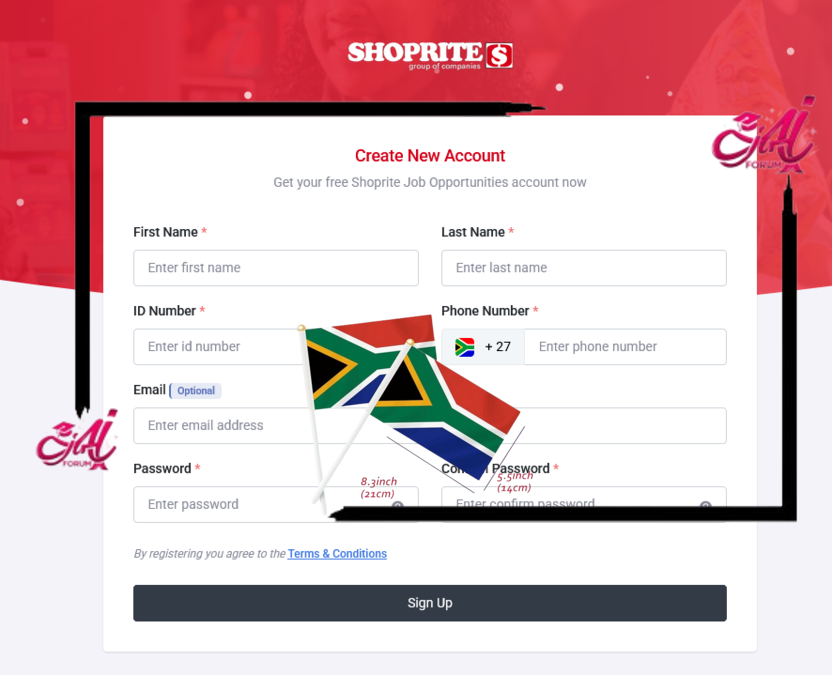
How to Register on the Shoprite Group e-Recruitment Portal for Job Applications

To access and use the e-Recruitment Portal, you need a device with internet access (computer or smartphone) and an active email address.

Step 1: Visit the Shoprite Careers Page

  1. Open a web browser and go to: https://www.shopriteholdings.co.za
  2. Click on the “Careers” tab or go directly to the e-Recruitment Portal via: https://apply.shoprite.jobs/register

Step 2: Register an Account

  1. Click on the “Register” button on the top-right corner of the page.
  2. Complete the registration form with the following details:
    • Full Name
    • Email Address
    • South African ID number (or passport for non-citizens)
    • Cellphone Number
    • Create a password
  3. Accept the terms and conditions.
  4. Click on the “Register” button to complete the process.

Step 3: Confirm Your Email Address

  • After registering, you will receive a confirmation email. Click the link in the email to verify your account.

Creating and Updating Your Profile

After email verification, log in to your account to create a detailed profile:

Personal Information

  • Upload a recent photo (optional)
  • Update your address and contact details

Education Background

  • Add your highest qualification
  • Include any ongoing studies or additional certifications

Work Experience

  • Add any past job experience
  • Include the name of the company, job title, and duration

Skills and Competencies

  • Mention relevant skills such as communication, computer literacy, customer service, etc.

Upload Documents

  • CV/Resume
  • Certified copies of ID and qualifications
  • Reference letters (if available)

Get More Opportunities

Currents South African Vacancies

Active Bursaries Programmes

Open Internship Opportunities

Apply for Learnerships Programme

Searching and Applying for Opportunities

Once your profile is complete, you can start searching and applying for opportunities:

Step 1: Browse Available Opportunities

  • On the portal homepage, use the search filters to find relevant vacancies (job title, location, category).

Step 2: Apply for a Job, Learnership, or Internship

  1. Click on the job title to view the full job description and requirements.
  2. Click the “Apply” button.
  3. Ensure your profile is up to date.
  4. Submit your application.

You will receive an email confirmation once your application is submitted.

How to apply Jobs on Shoprite e-Recruitment System

How to apply Jobs on Shoprite e-Recruitment System

Register Account

Register online with your name and contact details.

Set Password

Choose a password that you will remember so that you can update your details if anything changes.

Complete Details

Answer questions about your qualifications and experience.

Assessment

Complete an assessment exercise.

Next Steps

We will make contact if you move to the next stage in our employment process.


Orhan Mponda

Orhan Mponda

Next Post
A Complete Guide to Registering for the Department of Health Internship and Community Service Programme (ICSP)

A Complete Guide to Registering for the Department of Health Internship and Community Service Programme (ICSP)

  • Trending
  • Comments
  • Latest
Current Z83 Application Form Download in PDF and Word

Updated Z83 Application Form Download in PDF and Word

February 7, 2026
X400 Pikitup General Worker Vacancies Open in Johannesburg 2026

X400 Pikitup General Worker Vacancies Open in Johannesburg 2026

February 6, 2026
The SANDF Military Skills Development System (MSDS) Application Forms in PDF

The SANDF Military Skills Development System (MSDS) Application Forms in PDF

February 18, 2026
SANDF Military Skills Development System (MSDS) Programme Intake of 2027 Now Open

SANDF Military Skills Development System (MSDS) Programme Intake of 2027 Now Open

February 18, 2026
Apply for Momentum Agreement Support Administrator Internships 2026

Momentum Agreement Support Administrator Internships 2026

0
Fraser Alexander Vacancies- Assistant General Workers 2026

Fraser Alexander Vacancies- Assistant General Workers 2026

0
Takealot Graduate Internships Programme 2026

Takealot Graduate Internships Programme 2026

0
Collins Chabane Municipality Bursary Programme 2026

Collins Chabane Municipality Bursary Programme 2026

0
Sasria Bursary Programme 2026 for Undergraduate Students in South Africa

Sasria Bursary Programme 2026 for Undergraduate Students in South Africa

February 25, 2026
City Power ISDG Graduate Programme 2026 for South African Graduates

City Power ISDG Graduate Programme 2026 for South African Graduates

February 25, 2026
How to Unlock My NSFAS User Profile: Step-by-Step Guide for Students

How to Unlock My NSFAS User Profile: Step-by-Step Guide for Students

February 24, 2026
Coca-Cola Beverages South Africa (CCBSA) Human Resources Learnership 2026

Coca-Cola Beverages South Africa (CCBSA) Human Resources Learnership 2026

February 24, 2026

Recent Posts

  • Sasria Bursary Programme 2026 for Undergraduate Students in South Africa February 25, 2026
  • City Power ISDG Graduate Programme 2026 for South African Graduates February 24, 2026
  • How to Unlock My NSFAS User Profile: Step-by-Step Guide for Students February 24, 2026
  • Coca-Cola Beverages South Africa (CCBSA) Human Resources Learnership 2026 February 24, 2026
  • Mpumalanga CET College Opens TVET Placement Programme Applications for 2026 February 24, 2026
Ajiraforum

© 2026 Ajiraforum - Your Dream Job Destination Ajiraforum.

Navigate Site

  • Home
  • Privacy Policy
  • Disclaimer
  • About Us
  • Contact Us

Follow Ajiraforum

Welcome Back!

Login to your account below

Forgotten Password?

Retrieve your password

Please enter your username or email address to reset your password.

Log In
No Result
View All Result
  • Home
  • Jobs
  • Bursaries
  • Learnership
  • Internships
  • Apprenticeships
  • Guides

© 2026 Ajiraforum - Your Dream Job Destination Ajiraforum.