Close Menu
AjiraForum
  • Home
  • Jobs
  • Bursaries
  • Learnership
  • Internships
  • Apprenticeships
  • Guides
Facebook X (Twitter) Instagram
Trending
  • Orbit TVET College Prospectus 2027/2028 PDF Download
  • Waterberg TVET College Prospectus & Brochure 2027/2028 PDF Download
  • Nkangala TVET College(NTC) Prospectus & Brochure 2027/2028 PDF Download
  • Northern Cape Urban TVET College (NCUTVET) Prospectus 2027/ 2028 PDF Download
  • Varsity College Prospectus & Brochure 2027/2028 PDF Download
  • Vuselela TVET College Prospectus & Brochure 2027/2028 PDF Download
  • Mopani South East TVET College Prospectus 2027/2028 PDF Download
  • Vhembe TVET College Prospectus 2027/ 2028 PDF Download
Facebook X (Twitter) Instagram
AjiraForumAjiraForum
  • Home
  • Jobs
  • Bursaries
  • Learnership
  • Internships
  • Apprenticeships
  • Guides
AjiraForum
Home » How to Register on the Road Accident Fund (RAF) e-Recruitment Portal for Government Jobs
Guides

How to Register on the Road Accident Fund (RAF) e-Recruitment Portal for Government Jobs

Orhan MpondaBy Orhan MpondaFebruary 23, 2026No Comments1 Views
Facebook Twitter Pinterest LinkedIn WhatsApp Reddit Copy Link
How to Register on the Road Accident Fund (RAF) e-Recruitment Portal for Government Jobs
Share
Facebook Twitter LinkedIn Pinterest Email Telegram WhatsApp Threads Copy Link

The Road Accident Fund (RAF) is a South African public entity that provides compensation to victims of road accidents. If you want to work for RAF, all job applications must be submitted online through the RAF e-Recruitment Portal.

The RAF e-Recruitment Portal is the official online recruitment system used by the Road Accident Fund to:Advertise government job vacancies,Receive applications for permanent, contract, internship, and learnership positions,Manage and track applications in a secure environment

How to Register on the Road Accident Fund (RAF) e-Recruitment Portal for Government Jobs

Step 1: Visit the Official RAF Website

  1. Open your web browser and go to the official RAF website: www.raf.co.za.
  2. On the homepage, scroll to the bottom and click on “Careers”.
  3. This will redirect you to the RAF e-Recruitment Portal.

Step 2: Create an Account

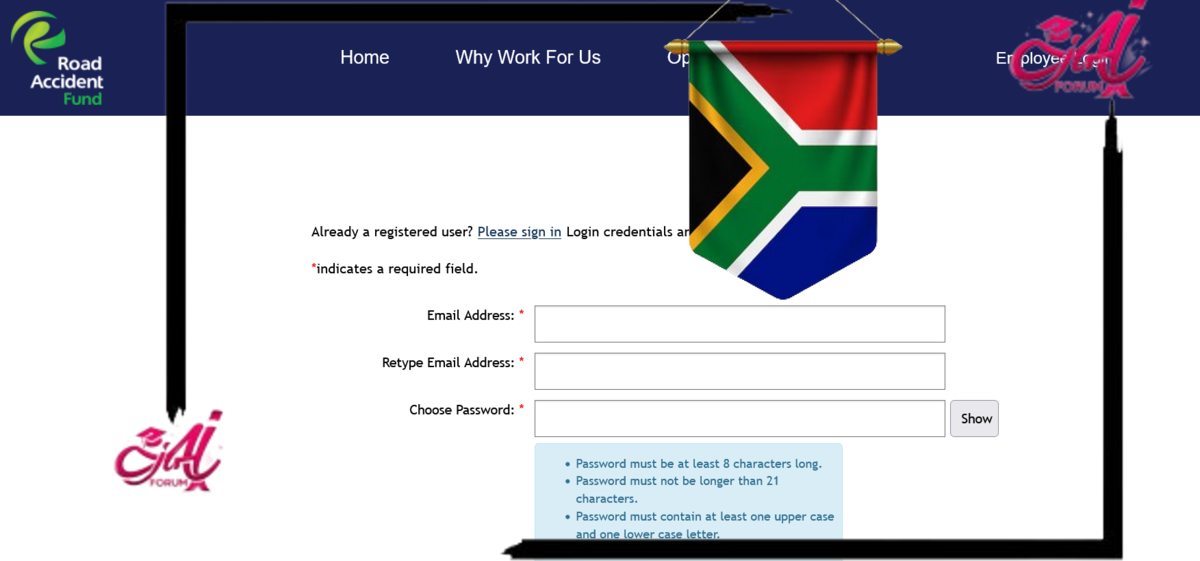
  1. On the e-Recruitment Portal landing page, look for the “Register” or “Sign Up” button.
  2. You will be prompted to enter your personal information:
    • Full name
    • South African ID number or passport number
    • Email address
    • Mobile number
  3. Create a username and secure password (make sure it is easy to remember but hard to guess).
  4. Accept the terms and conditions, then click “Register”.

Step 3: Email Verification

After registering, you will receive a verification email:

  • Open the email inbox you used for registration.
  • Click on the link provided in the verification email to activate your account.
  • If you don’t receive the email, check your spam/junk folder or resend the verification link from the portal.

Completing Your Profile

Step 4: Log In to Your Profile

  1. Return to the e-Recruitment Portal.
  2. Enter your username and password to log in.

Step 5: Fill In Your Personal and Educational Details

Once logged in, you’ll need to complete your profile. This includes:

  • Personal details: ID number, gender, race, disability status, and contact information.
  • Education: List your highest qualifications starting from Matric or Grade 12, including tertiary education.
  • Work Experience: Add any previous jobs, internships, or volunteer experiences.
  • Skills: Highlight your computer skills, languages, and any special training.
  • References: Include at least two professional references with contact details.

Step 6: Upload Your Documents

You’ll need to scan and upload the following certified documents:

  • South African ID or passport
  • Matric certificate or latest qualification
  • CV/Resume (Updated and well-structured)
  • Proof of residence (optional but recommended)
  • Any additional certificates or letters of recommendation

Use only PDF, Word, or JPEG formats, and ensure the file size does not exceed the portal limit (usually 5MB per file).

Get More Opportunities

Currents South African Vacancies

Active Bursaries Programmes

Open Internship Opportunities

Apply for Learnerships Programme

How to Apply for Jobs

Step 7: Browse Available Vacancies

    1. Click on “Vacancies” or “Job Opportunities” on the dashboard.
    2. Use filters to narrow down by category (General Work, Internship, Learnership, Entry-Level).
    3. Click on a job title to view the full job description, requirements, and closing date.

Internship application checklist

Step 8: Submit Your Application

  1. If you meet the requirements, click “Apply Now”.
  2. Confirm that your profile is complete and accurate.
  3. Attach any required documents (if not already on your profile).
  4. Click “Submit” – a confirmation message or email will be sent to you.

Tip: Always apply before the closing date and make sure your profile is updated before submission.

Step 9: Track Your Application

  1. Go to your dashboard and click on “My Applications”.
  2. You’ll be able to see the status of your submissions: pending, shortlisted, unsuccessful, or hired.

Step 10: Stay Updated

  • Log in regularly to check for new job posts.
  • Subscribe to RAF job alerts (if available).
  • Follow RAF on social media platforms for announcements.

Follow on WhatsApp Follow on Telegram
Share. Facebook Twitter Pinterest LinkedIn Telegram Email WhatsApp Copy Link
Previous ArticleHow Job Seekers Can Create a Sasol e-Recruitment Profile
Next Article How to Register, Upload a CV, and Apply for Government Jobs at NYDA e-Recruitment Portal
Orhan Mponda
  • Website

Related Posts

Botswana drivers licence theory test Matshwao a tsela PDF Download

Botswana drivers licence theory test Matshwao a tsela PDF Download

May 10, 2026
SASSA e-Life Certification Portal Online:Requirements and Registration Steps

SASSA e-Life Certification Portal Online:Requirements and Registration Steps

April 18, 2026
Sassa Grants Announces Payments Dates for April 2026

Sassa Grants Announces Payments Dates for April 2026

March 28, 2026

Comments are closed.

Recent Posts

  • Orbit TVET College Prospectus 2027/2028 PDF Download
  • Waterberg TVET College Prospectus & Brochure 2027/2028 PDF Download
  • Nkangala TVET College(NTC) Prospectus & Brochure 2027/2028 PDF Download
  • Northern Cape Urban TVET College (NCUTVET) Prospectus 2027/ 2028 PDF Download
  • Varsity College Prospectus & Brochure 2027/2028 PDF Download

Recent Comments

  1. Masha on Cato manor technical college Online Application Form 2025 /2026 Intake
Pages
  • About Us
  • Contact Us
  • Disclaimer
Recent Posts
  • Orbit TVET College Prospectus 2027/2028 PDF Download
  • Waterberg TVET College Prospectus & Brochure 2027/2028 PDF Download
  • Nkangala TVET College(NTC) Prospectus & Brochure 2027/2028 PDF Download
  • Northern Cape Urban TVET College (NCUTVET) Prospectus 2027/ 2028 PDF Download
  • Varsity College Prospectus & Brochure 2027/2028 PDF Download
About Ajiraforum

Ajira Forum is your ultimate online platform for discovering the latest South African opportunities, including Jobs, Bursaries, Scholarships,Internships, Learnerships, and Appreciation programs. Our mission is to connect job seekers, students, and young professionals with credible opportunities that help them grow, succeed, and achieve their career dreams.

The name Ajiraforum is a unique blend of two languages. “Ajira” comes from Swahili, meaning “Job”, while “Forum” comes from English, referring to a meeting place or platform for exchanging ideas. Together, Ajiraforum represents a “Job Forum” – a professional space where ideas, guidance, and opportunities converge.

© {2026} AjiraForum.com. Designed by AjiraForum.com.
  • Home
  • Disclaimer
  • About Us
  • Contact Us

Type above and press Enter to search. Press Esc to cancel.