

• Home
  • Privacy Policy
  • Disclaimer
  • About Us
  • Contact Us
Saturday, April 18, 2026
AjiraForum
  • Login
  • Home
  • Jobs
  • Bursaries
  • Learnership
  • Internships
  • Apprenticeships
  • Guides
No Result
View All Result
  • Home
  • Jobs
  • Bursaries
  • Learnership
  • Internships
  • Apprenticeships
  • Guides
No Result
View All Result
AjiraForum
No Result
View All Result
Home NSFAS Updates

My Nsfas Status Check: Complete Guide

Orhan Mponda by Orhan Mponda
September 27, 2024
in NSFAS Updates
0 0
0
Share on FacebookShare on TwitterShare on WhatsappShare on Email

My Nsfas Status Check: Complete Guide Check out full Guide to Track your NSFAS Application Progress through Online ,NSFAS Status Check Using ID Number and Nsfas Status check Using Reference Number.

Table of Contents

Toggle
  • How to Check Your NSFAS Status Online?
  • How Do I Check NSFAS Status Using ID Number?
  • How To Check Nsfas Status Using Reference Number?
  • Application Statuses 
  • Application Statuses and their Meanings
  • How to create my NSFAS account?
    • You need to fill in your
  • How to sign in to your account?
  • How to Contact NSFAS
        • NSFAS Virtual Contact Centre
          • We are available to assist through the following channels:
        • Account, Payment and Balance Enquiries
        • For general, student and NSFAS Wallet enquiries
        • NSFAS Ethics & Fraud hotline
        • For the submission of legal documentation for the attention of the National Student Financial Aid Scheme
        • Outreach and Community Event Invites

How to Check Your NSFAS Status Online?

Step 1: Visit the NSFAS website, and click on the myNsfas Student Portal tab, placed at the top right in Orange.

Step 2: Log in to your NSFAS account

Once you are on the myNSFAS website, you need to log in to your account. If you have not created an account yet, you need to do so by clicking on “create account” and following the prompts. You will need to provide your ID number and create a password.

Step 3: Click on the “View Applications” button

Once you have logged in to your account, you will be directed to your dashboard. Look for the “check your application status” button and click on it.
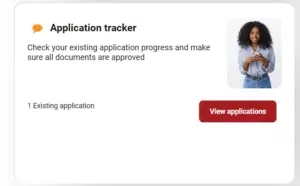
Nsfas status check


Step 4: View your NSFAS status

Your NSFAS application status will be displayed on the screen. If your application is successful, your status will be “approved” which means that your funding eligibility has been processed, and you may proceed to register at your chosen institution.

If your application is unsuccessful, you will see a message indicating that your application has been declined, meaning that you do not meet the requirements.

Step 5: Follow up on your application

If your application is unsuccessful, you can follow up with NSFAS to find out why your application was declined. You can also appeal the decision if you feel that you have been unfairly declined.

How Do I Check NSFAS Status Using ID Number?

Applicants who received NSFAS (National Student Financial Aid Scheme) funding will need to track their application progress. By logging into your online account, you will be able to view the NSFAS application status using id number of your application.

If you have already created an application, you can check the status by logging into your MyNSFAS account. Here are the steps:

  • Go to the NSFAS website: [https://www.nsfas.org.za/]
  • Click on the “MyNSFAS Login” button. It might be located in the top right corner or under a dedicated “Student Login” section.
  • Enter your login credentials: This will typically be your ID number and password created during your NSFAS application process.
  • Click “Login” to access your NSFAS account.

How To Check Nsfas Status Using Reference Number?

Follow these steps to perform a NSFAS Status Check with your reference number:

  1. If you are using a computer or mobile device, visit www.nsfas.org.za to access the official website of NSFAS.
  2. To access your NSFAS account, click on the “MyNSFAS Account” link, which is usually located at the top of the webpage.
  3. Use your email address and password to log in if you already have an account. Create an account by clicking on the “Register” link if you do not already have one.
  4. You can access the “Check Status” or “Application Status” section by clicking on the “My Applications” or “My Funding Applications” tab once logged in.
  5. In the designated field, enter your reference number. When you submitted your NSFAS application, you were provided with a reference number.
  6. If you would like to find out the status of your NSFAS application, click the “Submit” or “Check Status” button.
  7. On the screen, you’ll be able to view whether your NSFAS application has been approved, declined, or is still being processed. Also, you may receive additional information regarding your funding amount.

Application Statuses 

Following is the short explanation of the different NSFAS application statuses that appear while you are applying:

  • Application submitted: This means that your application was fed into the system of NSFAS.
  • Filtering: This status appears when the system is examining your application to verify it.
  • Validation: During this time, NSFAS is contacting the Department of Home Affairs for third party checkings.
  • Evaluation: During this time, NSFAS will verify your documents.
  • Funding Eligibility: This status appears when your financial status is being examined by NSFAS.
  • Awaiting Academic Results: This status appears when your academic results are being checked with your educational institute.
  • Awaiting Registration: This is when NSFAS is waiting for confirmation from your educational institute. 
  • Signing of argument: This appears when you are asked to sign the NSFAS agreement.
  • Payments: This status means that you can receive your fundings for your education. 

Application Statuses and their Meanings

When you have applied for the NSFAS application and you wish to check nsfas status, the term can be confusing for you. The meanings of different statuses of the NSFAS application that appear once you have applied are explained below:

  • Successfully funded: This means that your application was successfully submitted, was successfully processed and the funding process was successfully completed. You should register and start attending lectures. The funds provided by NSFAS will help you financially until the completion of your degree.
  • Eligible for funding but awaiting confirmation of academic admission: This NSFAS status means that your application was successfully submitted and accepted but the confirmation of your institution admission status is still pending. 
  • Verifying the household income with third-party sources: This nsfas status means that the verification of your household’s total income is still ongoing. Credit bureaus must confirm that the revenue you reported is below the R350,000 cap. Just wait for the notification that your financing has been improved and that you have been accepted in the programme in such a case.
  • Awaiting Evaluation: This nsfas status means that your NSFAS application has been received by NSFAS but a caseworker must yet approve it. In this case, you just have to wait for the notification notifying that you have been admitted to their programme.

Application unsuccessful: This nsfas status means that your application was not accepted. It may be due to multiple reasons such as your income is above R350,000 or that you are ineligible for NSFAS or that you were not admitted to a public institute or TVET college. You may ask your application to be reconsidered. 


How to create my NSFAS account?

If you do not have an email already:

If you do not have an email account already, the website mentions a tutorial video on how to make one. The steps are as follows:

  • Open your internet browser(e.g chrome, Firefox etc.) and search for “free email sites” in the search bar.
  • Select your preferred free email site such as gmail, yahoo etc.
  • You will get access to the “sign in” page. Click on the “create an account” tab since you do not have an existing account.
  • You will be needed to provide some personal information such as your name, your date of birth etc.
  • You will then be asked to create a username and password.
  • In the next step, you will be asked for some additional actions on your preferred email site, such as creating a full profile which includes adding up your profile picture too. These actions are optional.

After completing the above steps, you will now have your working email address which you can use in your forms and which you can log in to check your emails.

You need to fill in your

  • First name as seen on your ID card
  • your last name as seen on your ID card
  • your ID card number in the “applicant’s ID number” box
  • your email address in “applicant’s email” box (if you do not have an email address already, you can follow the above mentioned steps to create an email in this article).
  • your contact number in the “applicant’s contact number” box.
  • Then you have to tick in the “read and understood T&Cs” box. You can view their terms and conditions by clicking on “view T&C’s” before ticking in the box.
  • In the next step, you need to create a password for your account. You should create a strong password including letters, numbers and symbols. Avoid using your id number, name etc. in the password as it can be easily hacked in that case. Remember this password and id number to later check nsfas status using id number.
  • Tick in the “I’m not a robot” box to fulfill the recaptcha privacy terms.
  • Click on the “create account” button present in red color at the bottom of the page.

Once you have completed the above steps, you will receive an OTP (One Time Password) by the NSFAS team via a text message on your phone number or via an email. It is to confirm that it was actually you who created the account. This OTP will be in the form of digits. Enter this OTP in the desired box, and press “submit”. You are now fully registered.

How to sign in to your account?

Once you have created your account, you can log in to your account anytime to check my NSFAS status of your application. To sign in, visit their website. Click on the “myNSFAS” tab on the upper right corner of the site. The page that will open asks you to sign in by entering your ID number and your password. Enter your ID number and password in the boxes mentioned and click on the “login” button in red. You will be logged into your account.

How to Contact NSFAS

If you have any queries related to the application process or if you are having any issues in checking the status of your application, NSFAS provides various means to get your queries answered and to get your issues resolved. They can be contacted through their social media pages or directly through their phone number. You can also email them your queries. Different contact means are mentioned below:

NSFAS Virtual Contact Centre
We are available to assist through the following channels:

Email: info@nsfas.org.za
Facebook:National Student Financial Aid Scheme
Twitter: @myNSFAS
Instagram: @myNSFAS
WhatsApp: +27 63 093 5671
USSD:*120*67327#

Account, Payment and Balance Enquiries

For queries regarding payments and balances:
Tel No.: 08000 67327
Email: collections@nsfas.org.za

For general, student and NSFAS Wallet enquiries

For all other queries regarding students:
Tel No.: 08000 67327
Email: info@nsfas.org.za

Physical Address (Head Office):
The Halyard, 4 Christiaan Barnard St, Cape Town City Centre, Cape Town, 8001

NSFAS Ethics & Fraud hotline

To submit information on fraud or corruption identified or witnessed:
Tel No.: 0800 007 396
WhatsApp: 0860 004 004
Email: nsfas@behonest.co.za
Free Post: BNT165, Brooklyn Square, 0075
SMS Call Back Number: 48691
www.behonest.co.za

For the submission of legal documentation for the attention of the National Student Financial Aid Scheme

Email: legal@nsfas.org.za

Legal documentation not submitted and logged through this dedicated mailbox will be deemed invalid and will not receive timeous attention

Outreach and Community Event Invites

For all queries regarding outreach and community event invites:
Email: outreach@nsfas.org.za

WhatsApp Group Join Now
Telegram Group Join Now
Orhan Mponda

Orhan Mponda

RelatedPosts

How to Check Your Balance on Coinvest NSFAS (Step-by-Step Guide)
NSFAS Updates

How to Check Your Balance on Coinvest NSFAS (Step-by-Step Guide)

by Orhan Mponda
April 18, 2026
0

How to Check Your Balance on Coinvest NSFAS If you want to know How much do you have on Your...

What NSFAS Discontinuation of Funding Means: Complete Guide for Students
NSFAS Updates

What NSFAS Discontinuation of Funding Means: Complete Guide for Students

by Orhan Mponda
April 18, 2026
0

What NSFAS Discontinuation Of Funding Means?Discontinuation of NSFAS funding means that NSFAS has decided to withdraw or stop funding a...

How Does NSFAS Verify Household Income? Everything You Need to Know
NSFAS Updates

How Does NSFAS Verify Household Income? Everything You Need to Know

by Orhan Mponda
April 18, 2026
0

Nsfas financial eligibility check household income issue? In South Africa, where financial limitations frequently prevent students from pursuing higher education...

What “Provisionally Funded” Means in NSFAS (Full Explanation)

What “Provisionally Funded” Means in NSFAS (Full Explanation)

April 18, 2026

Steps to Write NSFAS Appeal Motivation Letter

November 5, 2024

Does NSFAS Charge Interest on Study Loans?

October 1, 2024
Load More
Next Post

How to Check NSFAS Status Using ID Number?

Please login to join discussion
  • Trending
  • Comments
  • Latest
Merit Scholarships Programme 2026 at University of Hamburg in Germany

University of Hamburg Merit Scholarships Programme for the year 2026 in Germany

March 16, 2026
UNCF STEM Scholarships 2026–2027 for College Students – Up to $25,000

UNCF STEM Scholarships 2026–2027 for College Students – Up to $25,000

March 14, 2026
Current Z83 Application Form Download in PDF and Word

Updated Z83 Application Form Download in PDF and Word

February 7, 2026
Salford International Excellence Scholarship Programme 2026 to study in UK (Funded)

Salford International Excellence Scholarship Programme 2026 to study in UK (Funded)

March 17, 2026
Apply for Momentum Agreement Support Administrator Internships 2026

Momentum Agreement Support Administrator Internships 2026

0
Fraser Alexander Vacancies- Assistant General Workers 2026

Fraser Alexander Vacancies- Assistant General Workers 2026

0
Takealot Graduate Internships Programme 2026

Takealot Graduate Internships Programme 2026

0
Collins Chabane Municipality Bursary Programme 2026

Collins Chabane Municipality Bursary Programme 2026

0
SASSA e-Life Certification Portal Online:Requirements and Registration Steps

SASSA e-Life Certification Portal Online:Requirements and Registration Steps

April 18, 2026
How to Check Your Balance on Coinvest NSFAS (Step-by-Step Guide)

How to Check Your Balance on Coinvest NSFAS (Step-by-Step Guide)

April 18, 2026
What NSFAS Discontinuation of Funding Means: Complete Guide for Students

What NSFAS Discontinuation of Funding Means: Complete Guide for Students

April 18, 2026
How Does NSFAS Verify Household Income? Everything You Need to Know

How Does NSFAS Verify Household Income? Everything You Need to Know

April 18, 2026

Recent Posts

  • SASSA e-Life Certification Portal Online:Requirements and Registration Steps April 18, 2026
  • How to Check Your Balance on Coinvest NSFAS (Step-by-Step Guide) April 18, 2026
  • What NSFAS Discontinuation of Funding Means: Complete Guide for Students April 18, 2026
  • How Does NSFAS Verify Household Income? Everything You Need to Know April 18, 2026
  • What “Provisionally Funded” Means in NSFAS (Full Explanation) April 18, 2026
SASSA e-Life Certification Portal Online:Requirements and Registration Steps

SASSA e-Life Certification Portal Online:Requirements and Registration Steps

April 18, 2026
How to Check Your Balance on Coinvest NSFAS (Step-by-Step Guide)

How to Check Your Balance on Coinvest NSFAS (Step-by-Step Guide)

April 18, 2026
What NSFAS Discontinuation of Funding Means: Complete Guide for Students

What NSFAS Discontinuation of Funding Means: Complete Guide for Students

April 18, 2026
How Does NSFAS Verify Household Income? Everything You Need to Know

How Does NSFAS Verify Household Income? Everything You Need to Know

April 18, 2026
What “Provisionally Funded” Means in NSFAS (Full Explanation)

What “Provisionally Funded” Means in NSFAS (Full Explanation)

April 18, 2026
Fully Funded Tsinghua University Schwarzman Scholarship 2026-27 in China

Fully Funded Tsinghua University Schwarzman Scholarship 2026-27 in China

April 17, 2026
ADVERTISEMENT

Pages

  • About Us
  • Contact Us
  • Disclaimer
  • Privacy Policy

Explore our Topics

  • Apprenticeships
  • Bursaries
  • Guides
  • Internships
  • Jobs
  • Learnership
  • NSFAS Updates

Recent Posts

  • SASSA e-Life Certification Portal Online:Requirements and Registration Steps
  • How to Check Your Balance on Coinvest NSFAS (Step-by-Step Guide)
  • What NSFAS Discontinuation of Funding Means: Complete Guide for Students
  • How Does NSFAS Verify Household Income? Everything You Need to Know
  • What “Provisionally Funded” Means in NSFAS (Full Explanation)

About Ajiraforum

AjiraForum is an online platform that provides the latest updates on job opportunities, internships, learnerships, bursaries, and career programs. Our goal is to help job seekers, students, and graduates easily access reliable information about employment and training opportunities across South Africa and other regions.

Through regularly updated content, AjiraForum guides users on application processes, requirements, and deadlines for various opportunities including government jobs, private sector vacancies, graduate programmes, and scholarships, helping individuals move forward in their careers.

© 2026 Ajiraforum - Your Dream Job Destination Ajiraforum.

Welcome Back!

Login to your account below

Forgotten Password?

Retrieve your password

Please enter your username or email address to reset your password.

Log In
No Result
View All Result
  • Home
  • Jobs
  • Bursaries
  • Learnership
  • Internships
  • Apprenticeships
  • Guides

© 2026 Ajiraforum - Your Dream Job Destination Ajiraforum.

This website uses cookies. By continuing to use this website you are giving consent to cookies being used. Visit our Privacy and Cookie Policy.