Is there Situation may Course your NSFAS (National Student Financial Aid Scheme) Student profile to be Locked Either it can be by Accident or For Security Purpose,This post will Guide you step by step to Reinstate your Profile.
Possible Reasons Why NSFAS Profiles Get Locked
Your NSFAS profile may be locked due to:
Entering the wrong password multiple times
Using outdated login credentials
Attempting to log in from multiple devices repeatedly
System security updates or maintenance
Incomplete account verification
Understanding the cause helps you avoid the issue in the future.
How to Unlock Your NSFAS User Profile (Step-by-Step)
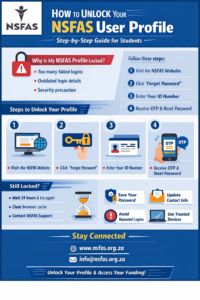
Follow these steps carefully to unlock your NSFAS account:
Visit the Official NSFAS Website
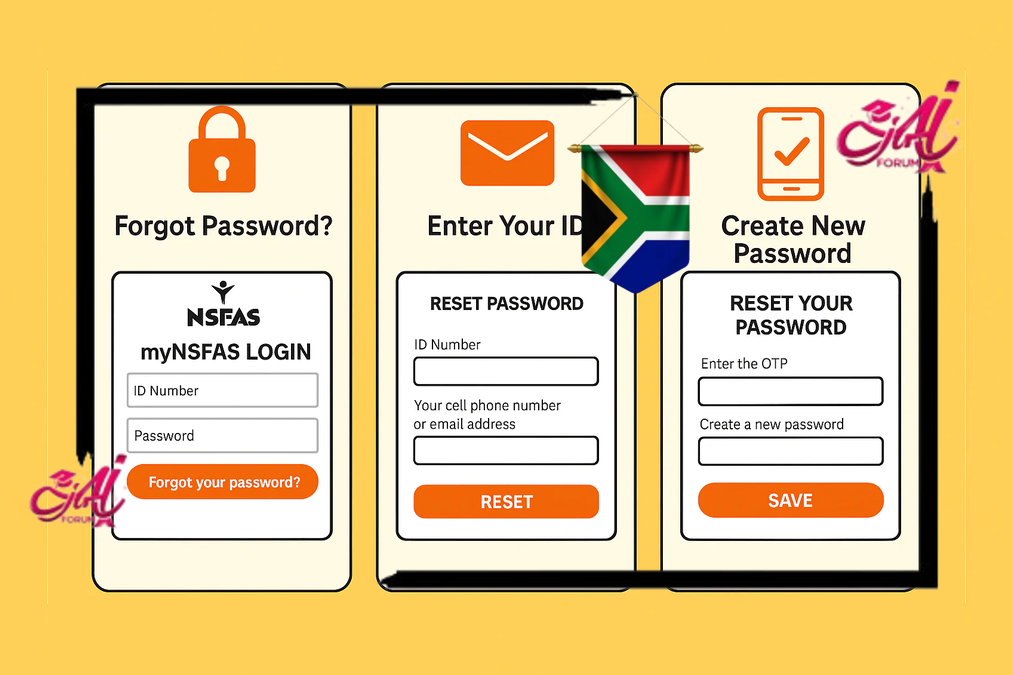
Go to the official NSFAS login page.Click on “Forgot Password”
This option allows you to reset your login credentials.Enter Your ID Number
Use the South African ID number you registered with.Receive and Verify the OTP
NSFAS will send a One-Time PIN (OTP) to your registered cellphone number or email address.Create a New Password
Choose a strong password that meets NSFAS security requirements.Log In Again
Once the password is reset, your profile should be unlocked automatically.
Alternative Method of Unlocking Your NSFAS User Profile
- Contact the NSFAS Contact Centre: You can call the NSFAS Contact Centre on 08000 67327 (08000 NSFAS) or email info@nsfas.org.za to request that your profile be unlocked.
- Provide your details: You will need to provide your ID number and your NSFAS application reference number when you contact the NSFAS Contact Centre. This will help them to locate your profile and unlock it.
- Follow the instructions provided: Once you have contacted the NSFAS Contact Centre, they will provide you with instructions on how to unlock your profile. This may involve answering security questions or providing additional information to verify your identity.
- Wait for confirmation: After you have followed the instructions provided by the NSFAS Contact Centre, you will need to wait for confirmation that your profile has been unlocked. This may take a few hours or a few days, depending on the volume of requests they are receiving.
It’s important to note that you may need to provide additional documentation or information to complete your NSFAS application once your profile has been unlocked. Make sure to check your email or contact the NSFAS Contact Centre for any additional instructions or requirements.
Check Helpful Video Step by Step to Unlock your NSFAS Profile
What to Do If the Profile Is Still Locked
If resetting your password does not unlock your account:
Wait 24 hours and try again
Clear your browser cache or use a different browser
Contact NSFAS support through official communication channels
Persistent issues may require manual assistance from NSFAS.
Frequently Asked Questions (FAQs)
What is NSFAS?
NSFAS is the National Student Financial Aid Scheme that provides financial assistance to eligible South African students.
Why is my NSFAS profile locked?
It is usually locked after multiple incorrect login attempts or for security reasons.
How long does a locked NSFAS profile stay locked?
In most cases, it unlocks immediately after a successful password reset.
Can I unlock my NSFAS account without resetting my password?
No, resetting your password is the main way to unlock your profile.
What details do I need to unlock my profile?
You need your South African ID number and access to your registered phone or email.
What if I no longer have access to my registered phone number?
You will need to contact NSFAS support to update your contact details.
Can I unlock my NSFAS profile using a mobile phone?
Yes, the NSFAS website is mobile-friendly.
Does NSFAS unlock accounts on weekends?
Password resets work online anytime, but support responses may be slower on weekends.
Will unlocking my profile affect my funding?
No, it does not affect your funding status.
What password is accepted by NSFAS?
A strong password with uppercase, lowercase, numbers, and special characters.
Can I try logging in many times?
No, repeated attempts can lock your account again.
Is there a fee to unlock my NSFAS account?
No, the process is completely free.
Can someone else unlock my profile for me?
No, for security reasons only the account owner can do it.
What browser works best for NSFAS?
Updated versions of Chrome, Firefox, or Edge work best.
Do I need to visit an NSFAS office?
No, most profile unlocks can be done online.
What if my OTP does not arrive?
Check your network, spam folder, or try again after a few minutes.
Can my profile be locked more than once?
Yes, if security rules are triggered again.
How do I keep my NSFAS account secure?
Use a strong password and never share your login details.
Can I unlock my profile during application season?
Yes, but expect higher system traffic.
Where can I get official NSFAS updates?
Through official NSFAS communication channels and announcements.