• Home
  • Privacy Policy
  • Disclaimer
  • About Us
  • Contact Us
Saturday, April 4, 2026
AjiraForum
  • Login
  • Home
  • Jobs
  • Bursaries
  • Learnership
  • Internships
  • Apprenticeships
  • Guides
No Result
View All Result
  • Home
  • Jobs
  • Bursaries
  • Learnership
  • Internships
  • Apprenticeships
  • Guides
No Result
View All Result
AjiraForum
No Result
View All Result
Home Guides

ZIMSEC online results Login portal – zimsec examination portal Login | www.zimsec.co.zw

ZIMSEC online results Login portal – zimsec examination portal Login | www.zimsec.co.zw

Orhan Mponda by Orhan Mponda
February 17, 2026
in Guides
0 0
0
ZIMSEC online results Login portal – zimsec examination portal Login | www.zimsec.co.zw

ZIMSEC online results Login portal – zimsec examination portal Login | www.zimsec.co.zw

Share on FacebookShare on TwitterShare on WhatsappShare on Email

Zimbabwe School Examinations Council has Launched the examination Online Portal for easily Access the results of all level in Zimbabwe this Guide well explained How you can register with Zimsec results portal for checking your Examination Results.

Table of Contents

Toggle
  • What is the Zimsec Results Portal?
  • How to access or login on ZIMSEC Examination Portal
  •  ZIMSEC Results Portal Checker
  • How to use ZIMSEC Results Portal Checker Accessing Your Results
  • How to Login  for the Candidate Module

What is the Zimsec Results Portal?

The Zimsec Results Portal is an online platform provided by the Zimbabwe School Examinations Council (Zimsec) where students can access their examination results. It allows students to conveniently check their results, view their subject grades, and download result slips for further use or documentation.

Advertisement. Scroll to continue reading.

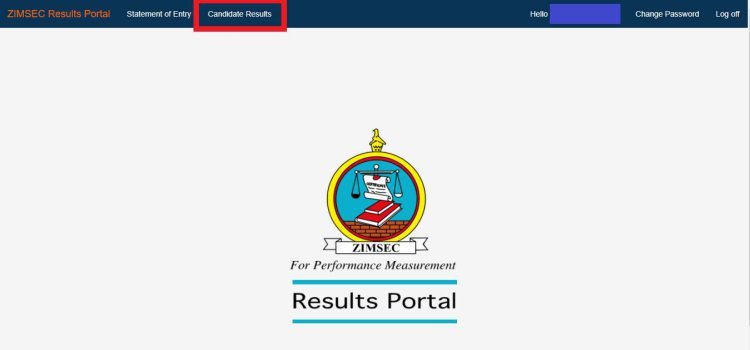
The ZIMSEC results portal serves as the official platform for viewing ZIMSEC results, including ZIMSEC Grade 7, O’Level or A’level Results Zimbabwe regional access links. Users can access statement of entry, level results, and register as new users for various examinations, such as ZIMSEC O level results, via the student portal login screen. It is important to note that when registering as a new user, instructions can be found on the right side of the screen for easy navigation to the zimsec student portal.

READ ZIMSEC Examinations Registration Process: Requirements and Guideline

How to access or login on ZIMSEC Examination Portal

The ZIMSEC Examination Portal can be accessed from any electronic device that supports the internet. Results on the Portal are in view only mode therefore they cannot be printed.

The Instructions on how to access the Results Portal are available on the ZIMSEC Examination Portal page and the ZIMSEC website www.zimsec.co.zw.

The ZIMSEC portal Can be accessed through the following link: https://zep.zimsec.co.zw , Alternatively the Links below can also be used to access the ZIMSEC examination portal page or  ZIMSEC portal login page directly: https://dcmv1.zimsec.co.zw/

  • ZIMSEC portal login

 ZIMSEC Results Portal Checker

The ZIMSEC Results Portal Checker is a tool that allows candidates to retrieve their results from the portal. Follow these steps to use the checker:

How to use ZIMSEC Results Portal Checker Accessing Your Results

  1. Visit the official ZIMSEC Results Portal at http://www.zimsec.co.zw
  2. choose your province
  3. Enter the six digit Centre Number.
  4.  Enter the four digit Candidate Number.
  5.  Choose session from the drop down list, either June or November.
  6.  Choose level from the drop down list, either O’Level or A’level.
  7.  Enter the Year you sat for the exam.
  8.  Enter your Candidate Name correctly ,starting with your surname followed by your firstname and then your initials(if you have a second name).
  9.  Enter your date of birth, using the dd/mm/yyyy format.
  10.  Enter a username that you would like to use for logging in to the application.
  11.  Enter a password, that comprises of a capital letter, digits,and non alphabetic characters. For example Zimsec123! would be a valid password.
  12.  Reenter the password in the confirm password text box.
  13. Enter the the security phrase of your choice for example, i am jonathan, take note of the spaces within your security phrase as these spaces are also considered as characters.
  14. Click the register button.
  15. If account registration is successful, the application will redirect to the login screen.
  16. If there are any errors, the application will display the errors on the screen.
  17. It’s important for the candidate to remember their Security Phrase and Username in case they loose their password.

How to Login  for the Candidate Module

  1. Visit the official ZIMSEC Results Portal at http://www.zimsec.co.zw
  2. Click the ‘Candidate Module’ button
  3. Enter your email address and password
  4. Click the ‘Login’ button
Tags: How to View ZIMSEC Results Online
WhatsApp Group Join Now
Telegram Group Join Now
Orhan Mponda

Orhan Mponda

RelatedPosts

Sassa Grants Announces Payments Dates for April 2026
Guides

Sassa Grants Announces Payments Dates for April 2026

by Orhan Mponda
March 29, 2026
0

Good News for The South African Social Security Agency (SASSA) Beneficiaries Because this time Around they will Collect their Money...

Dhet recruitment portal login
Guides

Dhet recruitment portal login

by Orhan Mponda
March 21, 2026
0

This guide provides step-by-step instructions to help applicants register, complete, and submit the Z83 form online using the e-Recruitment System....

Promotional requirements for grade 10 and 11 learners in 2026/2027 term
Guides

Promotional requirements for grade 10 and 11 learners in 2026/2027 term

by Orhan Mponda
March 7, 2026
0

The promotional requirements for Grade 10 and Grade 11 learners in the 2026/2027 academic year are important guidelines that determine...

Educator Single & Cross – Transfer Form Pdf Download

Educator Single & Cross Transfer: Form in PDF and Application Guide for South African Teachers

March 7, 2026
Sassa Announces Grant Payment Dates for March 2026

Sassa Announces Grant Payment Dates for March 2026

March 3, 2026
How to Claim Road Accident Fund (RAF) in South Africa

How to Claim Road Accident Fund (RAF) in South Africa

February 26, 2026
Load More
Next Post
ZIMSEC Examinations Registration Process: Requirements and Guideline

ZIMSEC Examinations Registration Process: Requirements and Guideline

Please login to join discussion
  • Trending
  • Comments
  • Latest
Merit Scholarships Programme 2026 at University of Hamburg in Germany

University of Hamburg Merit Scholarships Programme for the year 2026 in Germany

March 16, 2026
UNCF STEM Scholarships 2026–2027 for College Students – Up to $25,000

UNCF STEM Scholarships 2026–2027 for College Students – Up to $25,000

March 14, 2026
Current Z83 Application Form Download in PDF and Word

Updated Z83 Application Form Download in PDF and Word

February 7, 2026
Salford International Excellence Scholarship Programme 2026 to study in UK (Funded)

Salford International Excellence Scholarship Programme 2026 to study in UK (Funded)

March 17, 2026
Apply for Momentum Agreement Support Administrator Internships 2026

Momentum Agreement Support Administrator Internships 2026

0
Fraser Alexander Vacancies- Assistant General Workers 2026

Fraser Alexander Vacancies- Assistant General Workers 2026

0
Takealot Graduate Internships Programme 2026

Takealot Graduate Internships Programme 2026

0
Collins Chabane Municipality Bursary Programme 2026

Collins Chabane Municipality Bursary Programme 2026

0
Don’t Miss This! Gibela Rail Graduate Internships 2026 Now Open

Don’t Miss This! Gibela Rail Graduate Internships 2026 Now Open

April 1, 2026
SANParks Internship Programme 2026: Requirements, Stipend & Application Process

SANParks Internship Programme 2026: Requirements, Stipend & Application Process

April 1, 2026
Unilever Is Hiring Learners for Automated Packaging Programme 2026

Unilever Is Hiring Learners for Automated Packaging Programme 2026

April 1, 2026
Pepkor Lifestyle W&R SETA Learnership 2026 Opens for Applications

Pepkor Lifestyle W&R SETA Learnership 2026 Opens for Applications

April 1, 2026

Recent Posts

  • Don’t Miss This! Gibela Rail Graduate Internships 2026 Now Open April 1, 2026
  • SANParks Internship Programme 2026: Requirements, Stipend & Application Process April 1, 2026
  • Unilever Is Hiring Learners for Automated Packaging Programme 2026 April 1, 2026
  • Pepkor Lifestyle W&R SETA Learnership 2026 Opens for Applications April 1, 2026
  • Bosch Junior Business Administrator Learnership Programme 2026 Now Open April 1, 2026
Don’t Miss This! Gibela Rail Graduate Internships 2026 Now Open

Don’t Miss This! Gibela Rail Graduate Internships 2026 Now Open

April 1, 2026
SANParks Internship Programme 2026: Requirements, Stipend & Application Process

SANParks Internship Programme 2026: Requirements, Stipend & Application Process

April 1, 2026
Unilever Is Hiring Learners for Automated Packaging Programme 2026

Unilever Is Hiring Learners for Automated Packaging Programme 2026

April 1, 2026
Pepkor Lifestyle W&R SETA Learnership 2026 Opens for Applications

Pepkor Lifestyle W&R SETA Learnership 2026 Opens for Applications

April 1, 2026
Bosch Junior Business Administrator Learnership Programme 2026 Now Open

Bosch Junior Business Administrator Learnership Programme 2026 Now Open

April 1, 2026
SARF Bursary Programme 2026 for Civil Engineering and Transport Students

SARF Bursary Programme 2026 for Civil Engineering and Transport Students

March 31, 2026
ADVERTISEMENT

Pages

  • About Us
  • Contact Us
  • Disclaimer
  • Privacy Policy

Explore our Topics

  • Apprenticeships
  • Bursaries
  • Guides
  • Internships
  • Jobs
  • Learnership

Recent Posts

  • Don’t Miss This! Gibela Rail Graduate Internships 2026 Now Open
  • SANParks Internship Programme 2026: Requirements, Stipend & Application Process
  • Unilever Is Hiring Learners for Automated Packaging Programme 2026
  • Pepkor Lifestyle W&R SETA Learnership 2026 Opens for Applications
  • Bosch Junior Business Administrator Learnership Programme 2026 Now Open

About Ajiraforum

AjiraForum is an online platform that provides the latest updates on job opportunities, internships, learnerships, bursaries, and career programs. Our goal is to help job seekers, students, and graduates easily access reliable information about employment and training opportunities across South Africa and other regions.

Through regularly updated content, AjiraForum guides users on application processes, requirements, and deadlines for various opportunities including government jobs, private sector vacancies, graduate programmes, and scholarships, helping individuals move forward in their careers.

© 2026 Ajiraforum - Your Dream Job Destination Ajiraforum.

Welcome Back!

Login to your account below

Forgotten Password?

Retrieve your password

Please enter your username or email address to reset your password.

Log In
No Result
View All Result
  • Home
  • Jobs
  • Bursaries
  • Learnership
  • Internships
  • Apprenticeships
  • Guides

© 2026 Ajiraforum - Your Dream Job Destination Ajiraforum.

This website uses cookies. By continuing to use this website you are giving consent to cookies being used. Visit our Privacy and Cookie Policy.