
The SANDF Military Skills Development System (MSDS) Recruitment System on Both way Post office or by Hands it Require to Fill Application Form in proper way ,The First step you must Download the Form ,Second Fill it in proper way.
Sections Contained in SANDF Military Skills Development System (MSDS) Application Forms
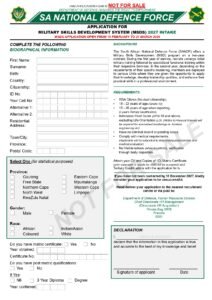
How to Fill the SANDF MSDS Application Form (Step-by-Step Guide)
Filling out the Military Skills Development System (MSDS) application form correctly is very important because the South African National Defence Force rejects incomplete or incorrect applications. Follow this step-by-step guide to complete it accurately and professionally.
Step 1: Read Instructions First
Before writing anything:
Read the entire form carefully
Understand every section
Check required documents
Never start filling the form without reviewing instructions.
READ: SANDF Military Skills Development System (MSDS) Programme Intake of 2027
Step 2: Complete Personal Details Section
Write exactly as shown on your ID:
Full names
ID number
Date of birth
Gender
Citizenship
Tip: Do not use nicknames or abbreviations.
Step 3: Fill Contact Information Correctly
Provide active contact details:
Physical address
Postal address
Cell phone number
Email address
✔ Ensure your phone number is working — recruiters will use it.
Step 4: Choose Your Service Branch
Select the division you want to join:
Army
Air Force
Navy
Military Health Service
Tick only the option you qualify for or prefer.
Step 5: Enter Education Details
List all academic information:
Highest grade passed
School name
Subjects
APS score
If you studied further:
Add college/university details
Include qualification name
Step 6: Fill Employment History (If Any)
If you have work experience:
Employer name
Position
Duration
If not, write:
N/A (Not Applicable)
Step 7: Complete Medical Section Honestly
You must declare:
Illnesses
Injuries
Disabilities
Medication
Lying about medical information can lead to disqualification later.
Step 8: Declare Criminal Record Status
Tick the correct option:
No criminal record
Criminal record (provide details)
Always answer truthfully — background checks will be conducted.
Step 9: Attach Required Documents
Attach certified copies of:
ID document
CV
Matric certificate or results
Qualifications (if any)
✔ Certification must usually be recent (not older than 3 months).
Step 10: Sign the Declaration Section
At the end of the form:
Sign your name
Write the date
Confirm information is correct
Unsigned forms are automatically rejected.
Final Checklist Before Submission
✔ All sections completed
✔ No blank spaces
✔ Correct spelling
✔ Documents attached
✔ Form signed