• Home
  • Privacy Policy
  • Disclaimer
  • About Us
  • Contact Us
Sunday, February 22, 2026
Ajiraforum
  • Login
  • Home
  • Jobs
  • Bursaries
  • Learnership
  • Internships
  • Apprenticeships
  • Guides
No Result
View All Result
  • Home
  • Jobs
  • Bursaries
  • Learnership
  • Internships
  • Apprenticeships
  • Guides
No Result
View All Result
Ajiraforum
No Result
View All Result
Home Guides

How to Register for the Eastern Cape Qualified Unemployed Educators Database (Step-by-Step Guide)

How to register on the unemployed database in the Eastern Cape? (Step-by-Step Guide)

Orhan Mponda by Orhan Mponda
February 22, 2026
in Guides
0 0
0
How to Register for the Eastern Cape Qualified Unemployed Educators Database (Step-by-Step Guide)

How to Register for the Eastern Cape Qualified Unemployed Educators Database (Step-by-Step Guide)

Share on FacebookShare on TwitterShare on WhatsappShare on Email

The database is an official online recruitment system created to streamline the hiring process for public schools. Instead of submitting applications repeatedly, educators upload their information once and update it whenever necessary. Schools and district offices can then search the database to find qualified candidates.

Table of Contents

Toggle
  • How to register on the unemployed database in the Eastern Cape?
  •  Required Documents you will Asked to Upload

How to register on the unemployed database in the Eastern Cape?

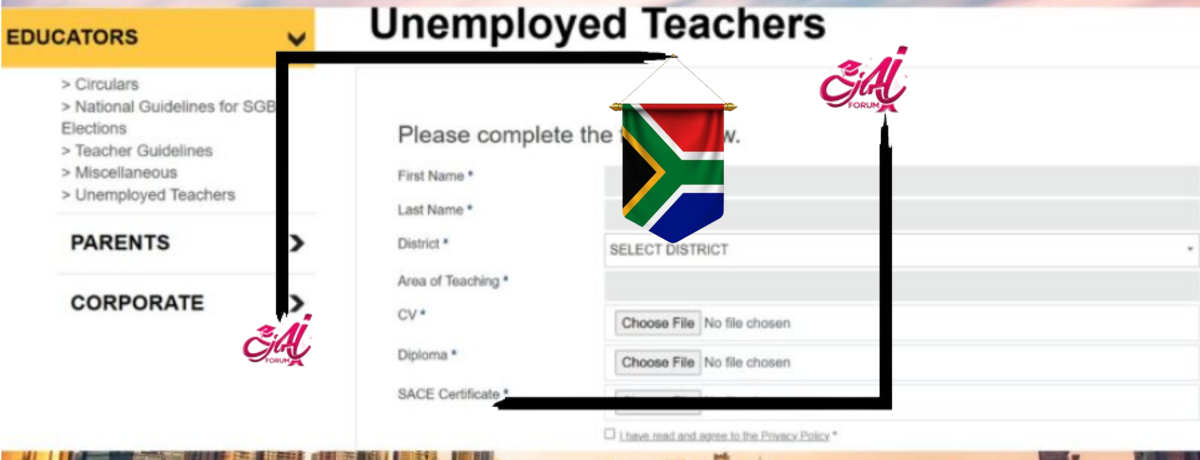
Access the ECDOE Unemployed Teachers Portal: Begin by visiting the ECDOE’s official website dedicated to unemployed teachers:

Complete the Online Registration Form: On the portal, you’ll find a form requiring the following information:​

  • Personal Details: Enter your first and last name.​
  • District Selection: Choose your district from options like Alfred Nzo East, Amathole West, Buffalo City Municipality, among others.​
  • Area of Teaching: Specify your teaching specialization.​

Get More Opportunities

Currents South African Vacancies

Active Bursaries Programmes

Open Internship Opportunities

Apply for Learnerships Programme

 Required Documents you will Asked to Upload

The portal will prompt you to upload the following documents:​

  • Curriculum Vitae (CV): Detailing your educational background, teaching experience, and relevant skills.​
  • Diploma/Degree Certificates: Certified copies of your teaching qualifications.​
  • South African Council for Educators (SACE) Certificate: Proof of your professional registration.​erecruitment.ecotp.gov.za

Ensure all documents are in the specified format and do not exceed the size limits indicated on the portal.​

Agree to the Privacy Policy: Before submission, read and agree to the ECDOE’s Privacy Policy to ensure you understand how your information will be used.​

Submit Your Application: After completing the form and uploading the necessary documents, click the “Submit” button.​

Confirmation of Registration: Upon successful submission, you should receive an acknowledgment confirming your registration. If you do not receive any confirmation, consider reaching out to the ECDOE’s Customer Care for assistance.​

REGISTER FOR THE EASTERN CAPE QUALIFIED UNEMPLOYED EDUCATOR DATABASE HERE

Additional Resources:

  • National Recruitment Database: The Department of Basic Education maintains a National Recruitment Database for qualified educators seeking employment across South Africa. To register, download and complete the Unemployed Educator’s Form and submit it along with certified copies of your qualifications to NRD@dbe.gov.za. ​
  • Provincial eRecruitment Portal: The Eastern Cape Provincial Government offers an eRecruitment system for various vacancies. Register and create a profile to apply for available positions. ​erecruitment.ecotp.gov.za

Contact Information:

  • Physical Address: Steve Vukile Tshwete Education Complex, Zone 6, Zwelitsha, 5608​
  • Postal Address: Private Bag X0032, Bhisho, 5605​
  • Customer Care: 080 1212 570​
  • Email: customercarecentre@ecdoe.gov.za​
  • Phone: +27 40 608 4200​
  • Fax: +27 40 608 4040

By diligently following these steps and ensuring all information is accurate and up-to-date, you enhance your prospects of securing a teaching position within the Eastern Cape.

Orhan Mponda

Orhan Mponda

Next Post
Nasi ispani gauteng job portal registration

Nasi Ispani Gauteng Job Portal Registration Guide (Step-by-Step Application Process)

  • Trending
  • Comments
  • Latest
Current Z83 Application Form Download in PDF and Word

Updated Z83 Application Form Download in PDF and Word

February 7, 2026
X400 Pikitup General Worker Vacancies Open in Johannesburg 2026

X400 Pikitup General Worker Vacancies Open in Johannesburg 2026

February 6, 2026
The SANDF Military Skills Development System (MSDS) Application Forms in PDF

The SANDF Military Skills Development System (MSDS) Application Forms in PDF

February 18, 2026
SANDF Military Skills Development System (MSDS) Programme Intake of 2027 Now Open

SANDF Military Skills Development System (MSDS) Programme Intake of 2027 Now Open

February 18, 2026
Apply for Momentum Agreement Support Administrator Internships 2026

Momentum Agreement Support Administrator Internships 2026

0
Fraser Alexander Vacancies- Assistant General Workers 2026

Fraser Alexander Vacancies- Assistant General Workers 2026

0
Takealot Graduate Internships Programme 2026

Takealot Graduate Internships Programme 2026

0
Collins Chabane Municipality Bursary Programme 2026

Collins Chabane Municipality Bursary Programme 2026

0
How to Register on the KwaZulu-Natal e-Recruitment Database for Government Jobs | S’thesha Waya-Waya

How to Register on the KwaZulu-Natal e-Recruitment Database for Government Jobs | S’thesha Waya-Waya

February 22, 2026
Limpopo e-Recruitment Database Registration Guide for Job Seekers

Limpopo e-Recruitment Database Registration Guide for Job Seekers

February 22, 2026
How to Install Netmirror App on Android ,Iphone and Smart tv Setup Guide ...

How to Install Netmirror App on Android ,Iphone and Smart tv Setup Guide …

February 22, 2026
Nasi ispani gauteng job portal registration

Nasi Ispani Gauteng Job Portal Registration Guide (Step-by-Step Application Process)

February 22, 2026

Recent Posts

  • How to Register on the KwaZulu-Natal e-Recruitment Database for Government Jobs | S’thesha Waya-Waya February 22, 2026
  • Limpopo e-Recruitment Database Registration Guide for Job Seekers February 22, 2026
  • How to Install Netmirror App on Android ,Iphone and Smart tv Setup Guide … February 22, 2026
  • Nasi Ispani Gauteng Job Portal Registration Guide (Step-by-Step Application Process) February 22, 2026
  • How to Register for the Eastern Cape Qualified Unemployed Educators Database (Step-by-Step Guide) February 22, 2026
Ajiraforum

© 2026 Ajiraforum - Your Dream Job Destination Ajiraforum.

Navigate Site

  • Home
  • Privacy Policy
  • Disclaimer
  • About Us
  • Contact Us

Follow Ajiraforum

Welcome Back!

Login to your account below

Forgotten Password?

Retrieve your password

Please enter your username or email address to reset your password.

Log In
No Result
View All Result
  • Home
  • Jobs
  • Bursaries
  • Learnership
  • Internships
  • Apprenticeships
  • Guides

© 2026 Ajiraforum - Your Dream Job Destination Ajiraforum.