

Close Menu
AjiraForum
  • Home
  • Jobs
  • Bursaries
  • Learnership
  • Internships
  • Apprenticeships
  • Guides
Facebook X (Twitter) Instagram
Trending
  • Thekwini TVET College Prospectus 2027/2028 PDF Download
  • Elangeni TVET College Prospectus 2027/2028 PDF Download
  • NWU Prospectus 2027/2028 PDF Download Undergraduate & Postgraduate
  • SPU Prospectus 2027/2028 PDF Download Undergraduate & Postgraduate
  • Ekurhuleni East TVET College(EEC) Prospectus 2027/2028 PDF Download
  • Sedcol Prospectus 2027/ 2028 PDF Download Sedibeng TVET College
  • Esayidi TVET College Prospectus 2027/2028 PDF Download
  • TNC Prospectus 2027/ 2028 PDF Download Tshwane North TVET College
Facebook X (Twitter) Instagram
AjiraForumAjiraForum
  • Home
  • Jobs
  • Bursaries
  • Learnership
  • Internships
  • Apprenticeships
  • Guides
AjiraForum
Home » HOW TO SUBMIT YOUR SARS TAX RETURN ONLINE USING eFILING
UIF Guides

HOW TO SUBMIT YOUR SARS TAX RETURN ONLINE USING eFILING

Orhan MpondaBy Orhan MpondaMay 10, 2026Updated:May 10, 2026No Comments1 Views
Facebook Twitter Pinterest LinkedIn WhatsApp Reddit Copy Link
What UIF C19 TERS ‘Bank Error’ Codes Mean :Error 77 (Account cannot be verified)
Share
Facebook Twitter LinkedIn Pinterest Email Telegram WhatsApp Threads Copy Link

HOW TO SUBMIT YOUR SARS TAX RETURN ONLINE USING eFILING Get Complete Guide tO SUBMIT YOUR SARS TAX RETURN ONLINE USING eFILING all steps we explained in this article.

How to use SARS eFiling to File Income Tax Returns

STEP 1: Get started by logging in

Go to www.sarsefiling.co.za.
On the right hand side of the screen you will see Log in, please click this option.
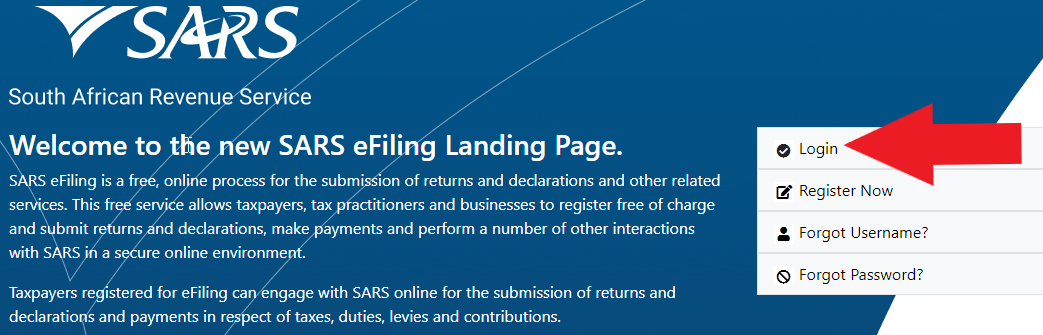
Then type in your unique username, click next and thereafter type in your password – you will have decided on these when you registered for eFiling. Then press login.

Didn’t register yet to eFile? See how to register for SARS eFiling step-by-step
If you used to use a tax practitioner and they did this for you, you should request your SARS eFiling login details from them – they belong to you.
Otherwise call SARS ZA on 0800 00 7277 (0800 00 SARS), provide your ID number and some other security details and they will restore access to your eFiling.

STEP 2: Generate your ITR12 tax return
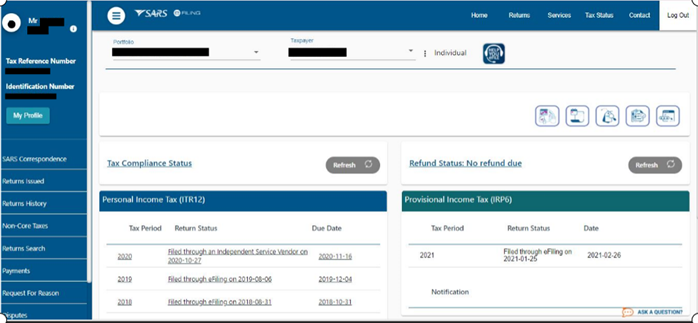
Make sure that your name appears at the top under Taxpayer List just in case you have logged onto someone else’s SARS eFile page.
If the title of the page is not INCOME TAX WORK PAGE then click the RETURNS ISSUED button in the menu on the left hand side.
In the menu on the left Returns Issued will open, showing Personal Income Tax (ITR12) – click Personal Income Tax (ITR12).

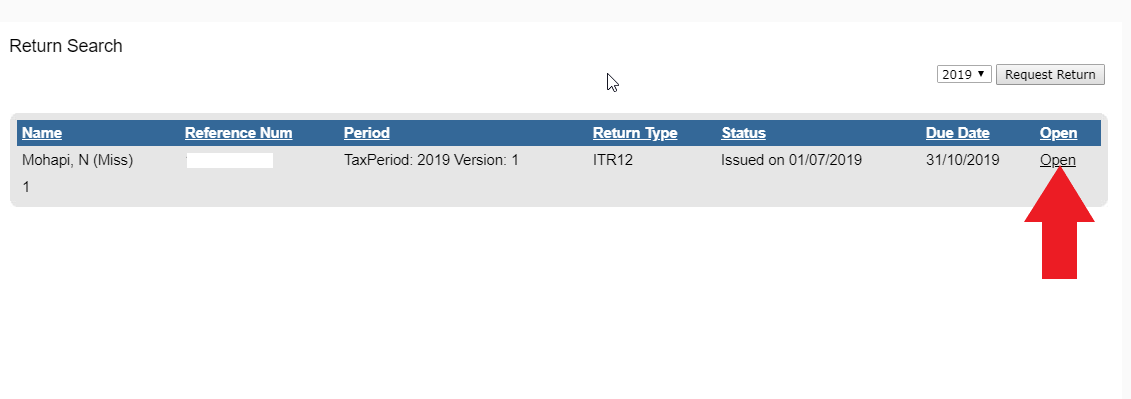
Once  you’ve followed all the steps, the page title will now be Return Search and should show the ITR12 returns you are busy with.

If you have already created your income tax return for the relevant year (it should be listed), jump to STEP 3 below.
Otherwise, select a tax year from the drop down selector box on the right hand side of the page and click Request Return. This tells SARS you would like to complete a return for that year and they generate it for you.
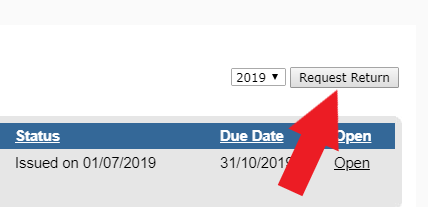
STEP 3: Start work on your income tax return

In the long blue box you will see the requested return showing your name, reference number, return type, status and due date. Click Open on the right hand side.
After reading the information pop-up (important info!), you will then find yourself on the INCOME TAX WORK PAGE of SARS eFiling.
This page summarises your tax return for the year.
Under return type, click ITR12. Note the Tax Period matches the tax season you are filing for.
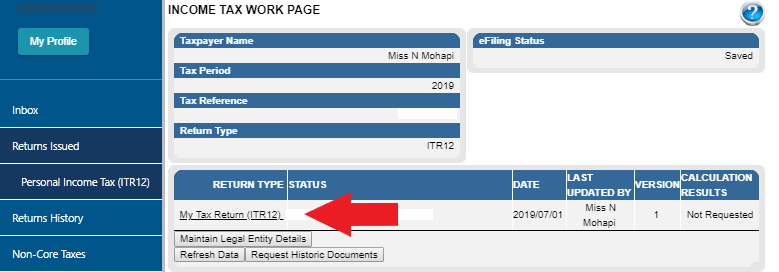
Depending on your browser this will either open in a new window or tab and may take a while to load fully.

STEP 4: Using the Wizard to setup the sections of your return

You have finally gotten to your actual tax return!
The very first page of your return on eFiling asks you a couple of questions in order to build a return that is specific to you personally.
For example, it will ask how many IRP5s you received from your employer, then the return that is generated will show that number of IRP5s on it for you to complete.

It will start out looking like this:
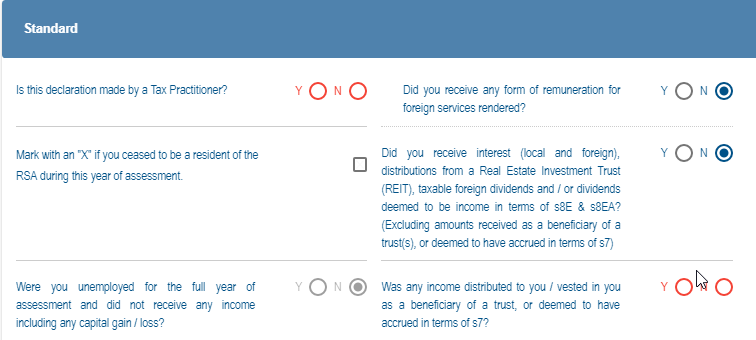
Then once you start filling it out – checking boxes and entering numbers – it will change, prompting you for more information.

STEP 5: Complete your return in eFiling

WARNING: Filling out your tax return without help can result in you paying too much tax, or getting a lower tax refund. Let TaxTim complete and submit your tax return in 20 minutes or less. It’s easy!

STEP 6: Submit and you’re done!

You can return to this page any time you like, click on your ITR12, make changes and save.
If you’re 100% happy, don’t click Save Return, click File Return and it’s done – you just got tax compliant all on your own!
If there is a pop-up, read it – you may have left something out!
What happens next???

Follow on WhatsApp Follow on Telegram
Share. Facebook Twitter Pinterest LinkedIn Telegram Email WhatsApp Copy Link
Previous ArticleHow to Reset uFiling Login Password in South Africa
Next Article How to Activate Your UIF Account Online Through uFiling System in South Africa
Orhan Mponda
  • Website

Related Posts

Causes of UIF Claims to Be Rejected (South Africa Guide)

May 11, 2026

The Consequences Of Not Paying UIF Contributions

May 11, 2026

How to Cancel UIF for R350 or Other Reasons?

May 11, 2026
Leave A Reply Cancel Reply

You must be logged in to post a comment.

Recent Posts

  • Thekwini TVET College Prospectus 2027/2028 PDF Download
  • Elangeni TVET College Prospectus 2027/2028 PDF Download
  • NWU Prospectus 2027/2028 PDF Download Undergraduate & Postgraduate
  • SPU Prospectus 2027/2028 PDF Download Undergraduate & Postgraduate
  • Ekurhuleni East TVET College(EEC) Prospectus 2027/2028 PDF Download

Recent Comments

No comments to show.
Pages
  • About Us
  • Contact Us
  • Disclaimer
Recent Posts
  • Thekwini TVET College Prospectus 2027/2028 PDF Download
  • Elangeni TVET College Prospectus 2027/2028 PDF Download
  • NWU Prospectus 2027/2028 PDF Download Undergraduate & Postgraduate
  • SPU Prospectus 2027/2028 PDF Download Undergraduate & Postgraduate
  • Ekurhuleni East TVET College(EEC) Prospectus 2027/2028 PDF Download
About Ajiraforum

Ajira Forum is your ultimate online platform for discovering the latest South African opportunities, including Jobs, Bursaries, Scholarships,Internships, Learnerships, and Appreciation programs. Our mission is to connect job seekers, students, and young professionals with credible opportunities that help them grow, succeed, and achieve their career dreams.

The name Ajiraforum is a unique blend of two languages. “Ajira” comes from Swahili, meaning “Job”, while “Forum” comes from English, referring to a meeting place or platform for exchanging ideas. Together, Ajiraforum represents a “Job Forum” – a professional space where ideas, guidance, and opportunities converge.

© {2026} AjiraForum.com. Designed by AjiraForum.com.
  • Home
  • Disclaimer
  • About Us
  • Contact Us

Type above and press Enter to search. Press Esc to cancel.