The SITA e-Recruitment Portal is the official online recruitment system used by SITA to advertise vacancies and manage applications. It is used for permanent jobs, contract roles, internships, learnerships, and graduate programmes.
How to Register on the SITA e-Recruitment Portal for Government Jobs
Step 1: Access the SITA e-Recruitment Portal
- Open your internet browser and go to the official SITA e-Recruitment Portal at:
https://www.eservices.gov.za or https://www.eservices.gov.za/eRecruitmentCitizen/Home/Jobs
- Make sure you are on the official website to avoid scams. Look for a government website address ending in “.gov.za”.
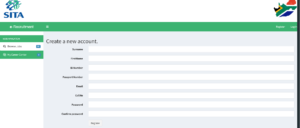
Step 2: Create a User Account
- On the homepage, click on the “Register” or “Sign Up” button.
- Fill in the required personal details, including:
- Full names
- South African ID number or passport number (if non-citizen)
- Valid email address
- Cellphone number
- Create a username and secure password
- Once you’ve completed the form, submit your registration.
- A verification link will be sent to your email. Click the link to verify your email address and activate your account.
Get More Opportunities
Currents South African Vacancies
Apply for Learnerships Programme
Step 3: Login and Complete Your Profile
- Return to the portal homepage and login using your username and password.
- Navigate to “My Profile” or “Update Profile”.
- Complete all sections, including:
- Personal information
- Contact details
- Educational qualifications (matric certificate, diplomas, degrees, etc.)
- Employment history (if any)
- Skills and languages
- References (if available)
Step 4: Upload Required Documents
To apply for government jobs, internships, or learnerships, ensure you upload certified copies of the following documents:
- South African ID document
- Matric certificate or highest qualification
- CV (Curriculum Vitae)
- Academic transcripts (for internships)
- Proof of residence (for certain opportunities)
- Any other certificates or documentation requested in the job advert
Note: Files should be in PDF format and not exceed the maximum upload size (usually 2MB per file).
Step 5: Search and Apply for Opportunities
- Go to the “Vacancies”, “Internships”, or “Learnerships” section.
- Use the search bar or filters to find the most suitable opportunity based on:
- Job title
- Location
- Department
- Closing date
- Click on a vacancy to view the full advert.
- Read the requirements and responsibilities carefully.
- If you meet the criteria, click “Apply”.
- Confirm that your profile and uploaded documents are up to date before submitting your application.