myExams Unisa Login Results: How to Access myExams and Check Your Unisa Results Be Guided 100% on how you can check your UNISA Examination results through myExams Unisa Login portal.
How to access and login to myExams Unisa Portal
It’s important to view your examination timetable before getting started. Each timetable should have a link along with a module code. This allows students to view the guidelines of each module. Thereafter, students should visit the UNISA portal.
Important Note: The Unisa Library’s services can only be accessed with an active myUnisa password. Students can visit my.unisa.ac.za to get their passwords.
How to login at myExams Unisa
- Visit https://myexams.unisa.ac.za/
- Next, click on Login
- Thereafter, you will be asked to enter your username and password.
- Click enter and you will get redirected to your profile
- If you have forgotten your password you can click on “forgot password”.
It’s important to access your exam 15 minutes prior to when the exam begins. Furthermore, students will require internet connectivity to download their exam question papers.
1. Download the exam
Next, find the exam date and click on it to find a list of module codes for the day. Thereafter, click on the module code that is scheduled for you.
2. Login and access the exam
Students will then need to log in once they have found the module code applicable to them. Thereafter, they will need to enter their myUnisa credentials, this is their UNISA student number and password.
Next, view the horizontal navigation bar and click on the name of the specific examination. Then, access the eAssessment tool on the left navigation menu. Lastly, download the examination paper and the additional resources attachment.
3. Complete the answers
Students can then begin the exam after downloading the examination papers. This can be done by either filling out the answers on a computer or hand-written on paper. It’s important to note that all answers will have to be submitted on a PDF document. Furthermore, students do not need to be online while they complete the exam.
4. Prepare to upload
After completing the exam students will need to prepare to upload their answers. Typed out answers need to be PDF formatted. Additionally, hand-written answers will need to be scanned and uploaded in PDF format. Ensure that all handwriting is clean and easy to read.
5. Upload answers
First, visit the MyExams Unisa portal and log in with your credentials. Next, click on the examination site located on the horizontal navigation bar. Click on the “eAssessment” tool in the left navigation bar. Thereafter, select the “Assessment Title” you want to upload. A new page will open. Here, you will need to scroll down to “Submission”. Upload your PDF document as an attachment. Lastly, tick the “Honor Pledge” box and submit the exam.
6. Confirmation
You will receive a confirmation message after you have successfully submitted your exam. Moreover, it’s important to take a screenshot of the confirmation message. This will ensure that you have a record of uploading your exam.
Students can also opt-in to receive email notifications. This will allow them to keep track of all their confirmations.
Frequently Asked Questions (FAQs)
What is myExams Unisa?
myExams is Unisa’s online examination platform used for accessing examination sites and completing certain online examination activities.
Can I check my Unisa results on myExams?
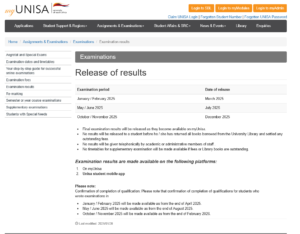
No. Final Unisa examination results are made available through myUnisa and the Unisa student mobile app.
Where do I check my Unisa examination results?
You can check your examination results by logging into your myUnisa account and accessing the relevant examination-results section.
How do I log into myExams Unisa?
Go to the official myExams portal and use your student number and myUnisa password to log in.
What is the official myExams login website?
The official myExams portal is available at myexams.unisa.ac.za/portal.
What password do I use for myExams?
You use your myUnisa login credentials, including your student number and password.
When were the May/June 2026 Unisa results released?
Unisa released the May/June 2026 examination results on a staggered basis, with most marks expected to be available by 10 July 2026.
Why is my Unisa examination result still outstanding?
Results are released on a staggered basis, so some modules may become available later than others.
Does an outstanding result mean that I failed?
No. An outstanding result does not automatically mean that you failed. It may simply mean that the mark has not yet been released or processed.
What does result code 1 mean at Unisa?
Result code 1 means that the student has passed the module.
What does result code 2 mean at Unisa?
Result code 2 indicates a pass with distinction.
What mark is a pass at Unisa?
According to Unisa’s May/June 2026 examination communication, a final mark of 50% or above represents a pass.
What mark is a distinction at Unisa?
Unisa states that a final mark of 75% or above represents a pass with distinction.
Can I check my Unisa results using the student app?
Yes. Unisa states that examination results are available through the Unisa student mobile app as well as myUnisa.
What should I do if myExams is not working?
Check your login credentials, refresh the page, clear your browser cache and try again. If the problem continues, contact Unisa through its official support channels.
Can I use my myUnisa password on myExams?
Yes. Unisa’s examination guide states that myExams is accessed using myUnisa credentials.
Can I apply for a Unisa remark?
Students may apply for a remark where permitted under Unisa’s examination rules and within the applicable deadline.
Where can I find the Examination Results tool?
The Examination Results tool is available within the relevant administrative section of myUnisa.
What email should I use when contacting Unisa about examination results?
For the May/June 2026 examination period, Unisa instructed students to use their official myLife email address when communicating with the university about examination matters.
Should I trust unofficial websites for my Unisa results?
Students should use official Unisa platforms to view their personal examination results and should not share their login credentials with third-party websites.
What is the difference between myExams and myUnisa?
myExams is primarily for examination activities, while myUnisa provides broader student services and is the main platform for viewing final examination results.