This Guide for the Government Job seeker in Gauteng, the Gauteng Provincial Government has created the Nasi Ispani Job Portal to help residents apply for available vacancies quickly and easily. This online system connects job seekers with public sector opportunities across departments and municipalities.
Nasi Ispani Overview and Objectives
The Nasi Ispani initiative was launched in 2023 by Gauteng Premier Panyaza Lesufi as part of a broader strategy to combat poverty and inequality by addressing unemployment. The platform complements other government programs such as the Expanded Public Works Programme (EPWP) and Youth Employment Services (YES), but it stands out for being a centralized, tech-driven portal for job applications across various sectors in Gauteng.
The primary objectives of the Nasi Ispani portal are:
- To streamline access to government jobs and learnerships.
- To reduce barriers to entry for young and unskilled job seekers.
- To create a transparent, fair, and accessible hiring process.
- To digitalize job matching, thereby enhancing efficiency and reach.
How the Portal Works
The Nasi Ispani Job Portal is accessible via the official Gauteng Provincial Government website or directly through https://jobs.gauteng.gov.za/. The platform is user-friendly and designed to accommodate individuals from diverse educational and technical backgrounds.
Requirements Before Registration
Prepare these details before starting:
South African ID number
Email address
Mobile phone number
Updated CV
Educational certificates
Proof of residence (if required)
Having these ready ensures faster registration.
Key Features:
- Online Registration:
Job seekers must first create a profile using their ID number, contact details, and personal information. A secure password protects the account. - Profile Building:
Users can upload their CVs, certified copies of qualifications, ID documents, and other supporting documents. The system allows users to update their profiles and application documents at any time. - Job Listings:
Available positions are listed with details such as job title, department, minimum requirements, location, closing date, and how to apply. - Filter and Search Options:
Users can filter jobs by category (e.g., internships, permanent posts, learnerships), qualification level, location, and department, helping them find the most relevant opportunities. - Application Tracking:
Applicants can track the status of their submissions to see if they have progressed to the next stage of recruitment.
How to Register on the Nasi Ispani Portal
Visit the Official Portal
Open the official Nasi Ispani job portal website using your browser.
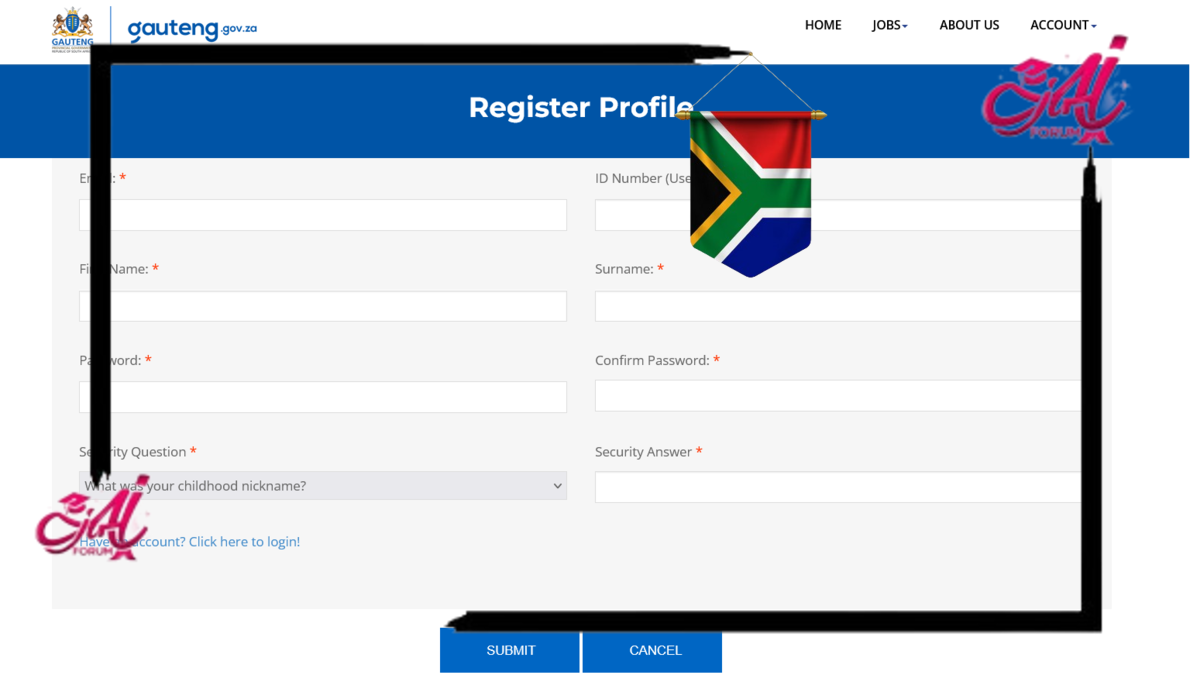
Click Register
Select the Sign Up / Register option on the homepage.
Enter Personal Details
Fill in:
Full name
ID number
Contact details
Email and password
Make sure your information matches official documents.
Verify Your Account
You may receive a verification code via SMS or email. Enter it to activate your account.
Complete Your Profile
Add:
Education history
Work experience
Skills and competencies
Job preferences
Incomplete profiles may not be considered.
Upload Documents
Upload clear copies of:
ID document
Certificates
CV
Ensure files are readable and correctly labeled.
Apply for Jobs
Browse available vacancies and click Apply for positions that match your qualifications.
How to Login After Registration
Go to the portal login page
Enter email or ID number
Enter password
Click Login
If you forget your password, use the Forgot Password option.
Types of Opportunities Available
The portal covers a wide range of job opportunities, including but not limited to:
- Administrative roles in provincial departments.
- Internships for graduates in fields such as public administration, finance, human resources, and IT.
- Learnerships and training programs in areas like waste management, early childhood development (ECD), paramedic training, and community policing.
- EPWP and short-term contract work aimed at unemployed individuals with limited experience.
- Special projects such as Crime Prevention Wardens, Service Delivery Brigades, and Township Revitalization programs.
Impact and Reach
Since its launch, the Nasi Ispani portal has received widespread attention and positive feedback. According to government statistics, over 1 million applications were submitted within the first few months, demonstrating a high demand for employment and training opportunities in Gauteng.
Tens of thousands of applicants have already been placed in jobs and internships across the province. The initiative is helping reduce unemployment, particularly among youth aged 18–35, who make up a large portion of the applicant base.