• Home
  • Privacy Policy
  • Disclaimer
  • About Us
  • Contact Us
Sunday, February 22, 2026
Ajiraforum
  • Login
  • Home
  • Jobs
  • Bursaries
  • Learnership
  • Internships
  • Apprenticeships
  • Guides
No Result
View All Result
  • Home
  • Jobs
  • Bursaries
  • Learnership
  • Internships
  • Apprenticeships
  • Guides
No Result
View All Result
Ajiraforum
No Result
View All Result
Home Guides

Limpopo e-Recruitment Database Registration Guide for Job Seekers

How to Register on the Limpopo e-Recruitment Database for Government Jobs

Orhan Mponda by Orhan Mponda
February 22, 2026
in Guides
0 0
0
Limpopo e-Recruitment Database Registration Guide for Job Seekers

Limpopo e-Recruitment Database Registration Guide for Job Seekers

Share on FacebookShare on TwitterShare on WhatsappShare on Email

The Limpopo e-Recruitment database is an online job application platform used by provincial government departments to manage recruitment. Instead of submitting paper applications, candidates register once and apply for multiple jobs digitally.

Key functions of the system:

  • Online job applications

  • Profile management

  • Vacancy notifications

  • Application tracking

  • Centralized recruitment

This makes the hiring process faster and more transparent for both applicants and employers.

Table of Contents

Toggle
  • Who Can Register?
  • Documents Required for Registration
  • How to Register on the Limpopo e-Recruitment Database for Government Jobs
  • Opportunities Available on the Platform
  • Tips for a Successful Application

Who Can Register?

Anyone who meets the minimum requirements for available opportunities can register. This includes:

  • Unemployed youth
  • Matriculants
  • Graduates (Diploma, Degree, or higher)
  • People with disabilities
  • Individuals with no formal work experience
  • TVET college students
  • SETAs Learnership seekers
  • Community members interested in EPWP jobs

Documents Required for Registration

Before you start, make sure you have the following documents scanned and saved in PDF format:

  • Certified copy of your ID document
  • Certified copies of your qualifications (Matric certificate, Diploma, Degree, etc.)
  • CV/Resume (updated and neatly formatted)
  • Proof of residence (for local-based jobs and EPWP)
  • Banking details (required for EPWP and internships)
  • Certified copy of disability confirmation letter (if applicable)

Note: Certifications should not be older than 6 months.

How to Register on the Limpopo e-Recruitment Database for Government Jobs
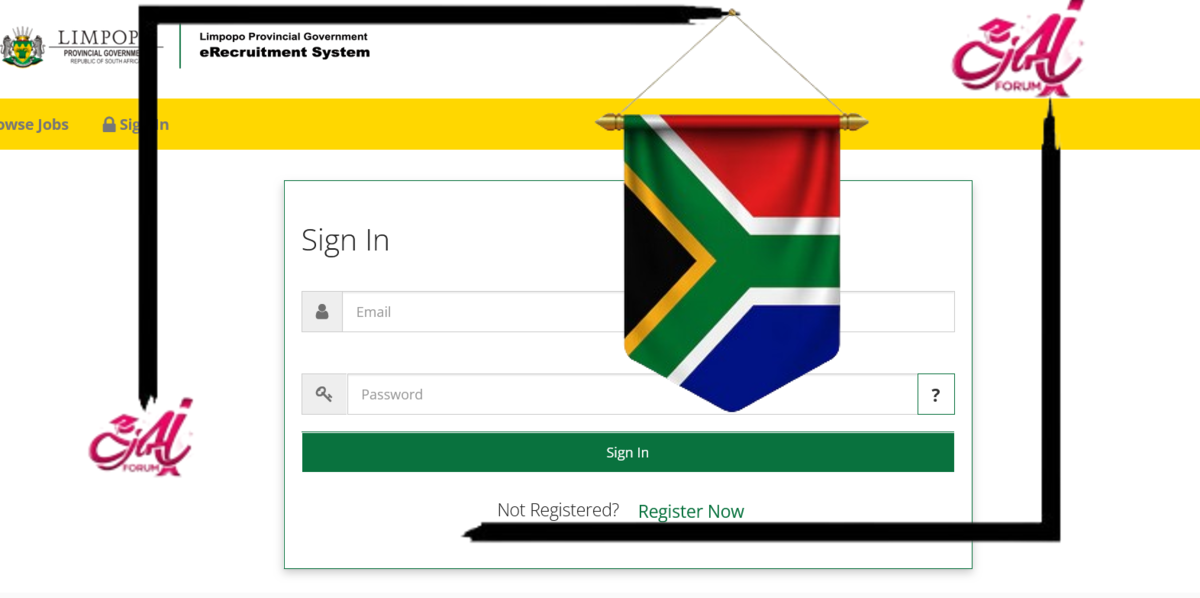
How to Register on the Limpopo e-Recruitment Database for Government Jobs

Step 1: Visit the Official Website

Go to the Limpopo Provincial Government’s official e-Recruitment portal:

https://erecruitment.limpopo.gov.za

You can also access it from the official provincial website under the “Careers” or “Jobs” section.

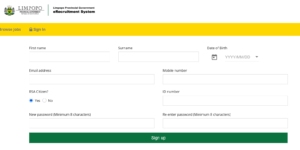
Step 2: Create an Account

  • Click on “Register” or “Create New Profile.”
  • Fill in your personal information, including:
    • Full name
    • ID number
    • Email address
    • Cellphone number
    • Password (create a secure password)

Once done, verify your email or phone number (you may receive an OTP for verification).

Step 3: Complete Your Profile

After logging in, complete your online profile. Sections include:

  • Personal details
  • Address & contact info
  • Education history
  • Skills & competencies
  • Employment history (if any)
  • Languages spoken
  • Disability status (if applicable)

Step 4: Upload Supporting Documents

Upload your CV, ID, certificates, and any additional documents. Ensure each document is clearly scanned and saved under the correct label.

Step 5: Search for Opportunities

Use the portal’s “Search Jobs” tool to browse available:

  • Government vacancies
  • SETA-funded Learnerships (e.g., LGSETA, PSETA, HWSETA)
  • Internships (12-month to 24-month contracts)
  • Entry-level admin jobs
  • EPWP work opportunities in your municipality

You can filter by department, job type, or location.

Step 6: Apply Online

  • Click “Apply” next to the job/learnership you are interested in.
  • Review the requirements and click “Submit Application”.
  • You will receive a reference number and email confirmation.

Get More Opportunities

Currents South African Vacancies

Active Bursaries Programmes

Open Internship Opportunities

Apply for Learnerships Programme

Opportunities Available on the Platform

Here’s a breakdown of some key opportunities you can find:

Entry-Level Jobs

  • Administration Clerks
  • Data Capturers
  • General Workers
  • Cleaners
  • Messengers and drivers
  • Security Officers

Requirements: Matric or Grade 10/12, no prior experience needed for most.

Internships

  • Offered by provincial departments (Health, Education, Treasury, etc.)
  • Duration: 12–24 months
  • Stipend: R4,000 – R6,000/month

Requirements: Relevant Diploma or Degree, aged 18–35.

Learnerships (SETAs)

  • Funded by SETAs such as PSETA, LGSETA, HWSETA, and ETDPSETA.
  • Duration: 12 months
  • Includes theory and workplace training

Examples: Office Administration, Community Health Work, Public Management, ICT

Requirements: Matric, aged 18–35, willing to learn.

EPWP Jobs

  • Temporary, short-term jobs for community members
  • Focused on infrastructure maintenance, cleaning, food aid, etc.
  • Stipend-based work (2–6 months)

Requirements: Basic literacy, no experience, local residence preferred.

Tips for a Successful Application

  • Complete your profile 100% – Incomplete profiles are often excluded from shortlisting.
  • Keep your documents updated – Expired certifications or missing documents may disqualify you.
  • Apply early – Opportunities are competitive; don’t wait for the closing date.
  • Check your email and phone regularly – For interview notifications or updates.

Orhan Mponda

Orhan Mponda

Next Post
How to Register on the KwaZulu-Natal e-Recruitment Database for Government Jobs | S’thesha Waya-Waya

How to Register on the KwaZulu-Natal e-Recruitment Database for Government Jobs | S’thesha Waya-Waya

  • Trending
  • Comments
  • Latest
Current Z83 Application Form Download in PDF and Word

Updated Z83 Application Form Download in PDF and Word

February 7, 2026
X400 Pikitup General Worker Vacancies Open in Johannesburg 2026

X400 Pikitup General Worker Vacancies Open in Johannesburg 2026

February 6, 2026
The SANDF Military Skills Development System (MSDS) Application Forms in PDF

The SANDF Military Skills Development System (MSDS) Application Forms in PDF

February 18, 2026
SANDF Military Skills Development System (MSDS) Programme Intake of 2027 Now Open

SANDF Military Skills Development System (MSDS) Programme Intake of 2027 Now Open

February 18, 2026
Apply for Momentum Agreement Support Administrator Internships 2026

Momentum Agreement Support Administrator Internships 2026

0
Fraser Alexander Vacancies- Assistant General Workers 2026

Fraser Alexander Vacancies- Assistant General Workers 2026

0
Takealot Graduate Internships Programme 2026

Takealot Graduate Internships Programme 2026

0
Collins Chabane Municipality Bursary Programme 2026

Collins Chabane Municipality Bursary Programme 2026

0
How to Register on the KwaZulu-Natal e-Recruitment Database for Government Jobs | S’thesha Waya-Waya

How to Register on the KwaZulu-Natal e-Recruitment Database for Government Jobs | S’thesha Waya-Waya

February 22, 2026
Limpopo e-Recruitment Database Registration Guide for Job Seekers

Limpopo e-Recruitment Database Registration Guide for Job Seekers

February 22, 2026
How to Install Netmirror App on Android ,Iphone and Smart tv Setup Guide ...

How to Install Netmirror App on Android ,Iphone and Smart tv Setup Guide …

February 22, 2026
Nasi ispani gauteng job portal registration

Nasi Ispani Gauteng Job Portal Registration Guide (Step-by-Step Application Process)

February 22, 2026

Recent Posts

  • How to Register on the KwaZulu-Natal e-Recruitment Database for Government Jobs | S’thesha Waya-Waya February 22, 2026
  • Limpopo e-Recruitment Database Registration Guide for Job Seekers February 22, 2026
  • How to Install Netmirror App on Android ,Iphone and Smart tv Setup Guide … February 22, 2026
  • Nasi Ispani Gauteng Job Portal Registration Guide (Step-by-Step Application Process) February 22, 2026
  • How to Register for the Eastern Cape Qualified Unemployed Educators Database (Step-by-Step Guide) February 22, 2026
Ajiraforum

© 2026 Ajiraforum - Your Dream Job Destination Ajiraforum.

Navigate Site

  • Home
  • Privacy Policy
  • Disclaimer
  • About Us
  • Contact Us

Follow Ajiraforum

Welcome Back!

Login to your account below

Forgotten Password?

Retrieve your password

Please enter your username or email address to reset your password.

Log In
No Result
View All Result
  • Home
  • Jobs
  • Bursaries
  • Learnership
  • Internships
  • Apprenticeships
  • Guides

© 2026 Ajiraforum - Your Dream Job Destination Ajiraforum.